I wish to share some of my own experiences and methods that I normally use when taking blue sky photographs. Of cause, those are not my own methods but rather are general widely used methods that everyone else are doing. Let me cut straight to the points.. .
Foreword : Don’t expect any of these will work if there is no blue sky seen. Unless you want to paste in a Blue sky from other photo.
Basic rules / steps to follow
- Best time to take nice blue sky is in the morning or when the sun is at the horizon, at an angle other then is on top of your head.
- Always use front light when taking the photographs. (Meant the Sun is at your back and not in front of you, best effect is sun + you + front scene is in straight line (± 45 degree angle) unless you are using polarizer)
- If your camera has White Balance setting, set it to “Sun / Day” mode. If you have custom WB setting and WB reference card then is even easier. I am personally using WhiBal Ref card for custom WB.
- Under expose the picture slightly by 1/3 ~ 1/2 stops depends on the scene if it is not clips on the dark area.
- If you have a polarizer, it has the capability to eliminates the reflection of the air particles and produce a much deeper / richer blue sky. There are many instructions on the web explaining how to best use a Polarizer to achieve that. So, i am not going to repeat those and you can simply googling around and you will find lot of them.
- The sample below were taken few years ago at Cameron Highland for comparison. The 1/2 left is without CPL and right 1/2 is with CPL. ( Circular Polarizer is used for Auto focus camera )
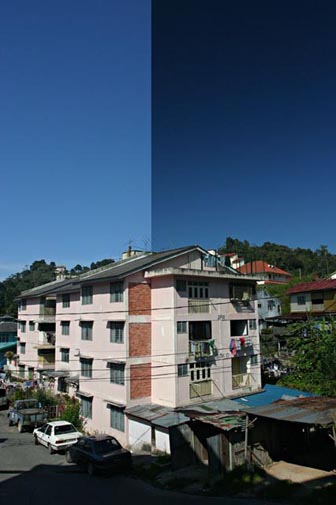
CPL test during Cameron trip
- Try this if you don’t do post processing on computer, if not.. skip to the next set.
-
- Increase the contrast slightly
- Increase the Saturation slightly
- (If you are canon dSLR user, switch to “Landscape” picture style)
-
- If you do post processing on computer, try to achieve these using your favorite editing software.
- Increase contrast via the Curve adjustment. ( A slight S curve will do )
- Adjust color wheel / HUE adjustment on Blue channel within the range of 0 ~ ±10 depends on effect you see.
- Increase overall saturation as about 10% ~ 20% ( beware of over doing it )
- If you want to achieve more “fake” / “dramatic” deep blue, use selective area on the sky and decrease further exposure on that area.
- The following comparison example is edit using software in stead of using CPL. Left is before, right is after, using the few setting I listed up here.
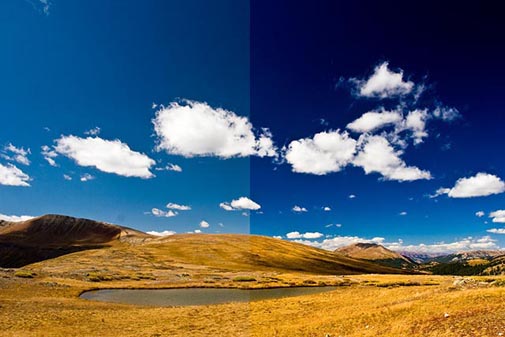
I hopes my sharing on my Blue sky taking could benefits some of you that interested / curious on how do I achieve that. Let me know if you have further questions / suggestions or even wish to shares your own view.
thanks for the sharing KH…
it is really help a lot… /happy
Akira, Toto, Deejay : welcome and hopes those help.
toto, welcome to our new site.
谢谢你的指导呢…
/admire
/admire /admire /admire
说的对,我也是尽量在拍摄时先把设定调效,这样会比较简单,也不必为后期花太多的时间。现在的我已恢复“平常心”不再去花太多心思在拍照上,尤其是旅行照,旅途也会因此而轻松。 🙂
I have 2 of these, 1 x 77mm and 1 x 55 mm used for 3 different lens. Still lack of one more step down ring so that all of my 4 lenses can use them. It is very useful, especially doing landscape photography. I will shares something on the books I am reading once I finish them. ( if i can /blurblur )
试了后记得和我们分享你的成果。
不必客气,有时会担心别的摄影达人会嘲笑我的分享。 /phew
谢谢你的分享!
谢谢你的分享。
有机会、时间,我会试试看 /tq
我比较喜欢用偏光镜(CPL)。后期制作对我来说是个噩梦。。。
/phew
I’m thinking of getting one, handy little tool. 🙂
I wish to shows here with few pictures that I taken with compact camera today.
The reasons are to shows that you can take reasonable blue sky photo using the methods even with a compact camera. These 4 photographs are taken in default camera settings beside setting the custom white balance. The pictures are directly resized and posted without any editing at all.