Albert shared with me on the post he made on FotoKrazy few days ago about he found a software, Flash Memory Toolkit that can use to test Memory Cards / Card Readers / PC combination read / write profile. I was about to run the test on the cards I have and also card readers that I have. At the same time, couple of folks at dpreview also asking if someone can perform some tests within the Sandisk’s Class 6 Extreme III vs Transcend Class 6 on DMC-LX3 for shots to shots time.
So, here am I.. trying to do some basic testings with what I had. Due to the limited resources I had, I have also ran them at the best I could and the results are no way to be qualify as accurate and should only be taken as some non control tests references if you decides to take a look.
Test Equipment :

- USB 2.0 Card readers –
- Old Apacer Mega Sterno MG820 ( Non SDHC )
- SanDisk MicroMate
- DMC-LX3 used as Card reader
- Memory Cards
- Belkin eFilm, DDSDFLS1-2GB
- Transcend Class 6 SDHC 8GB
- SanDisk Extreme III SDHC 8GB
- SanDisk For Wii, Class 2 SD, 2GB ( just for fun, since i am having it )
Test Procedures :
- Using the File Benchmark tool on the Flash Memory Toolkit ( Evaluation copy ), I ran the tests 2 x per combination.
- Apacer Mega Sterno is only tested with Non-SDHC cards.
- Testing with Transcend Class 6 and SanDisk Extreme III have been ran 3 x on the 2 readers.
- On testing the Shots to Shots on the DMC-LX3, I set the camera to capture Raw + Jpg and Unlimted multiple shots.
- All test are on a DIY PC system running on Vista Ultimate with 4GB Ram with E6600 Processor
Test results with Flash Memory Toolkit
Set 1 with Apacer’s Mega Sterno card reader
Belkin eFilm DDSDFLS1-2GB


SanDisk For Wii Class 2

Set 2 with SanDisk MicroMate card reader
Belkin eFilm DDSDFLS1-2GB


SanDisk Extreme III 8G


Transcend Class 6 8G
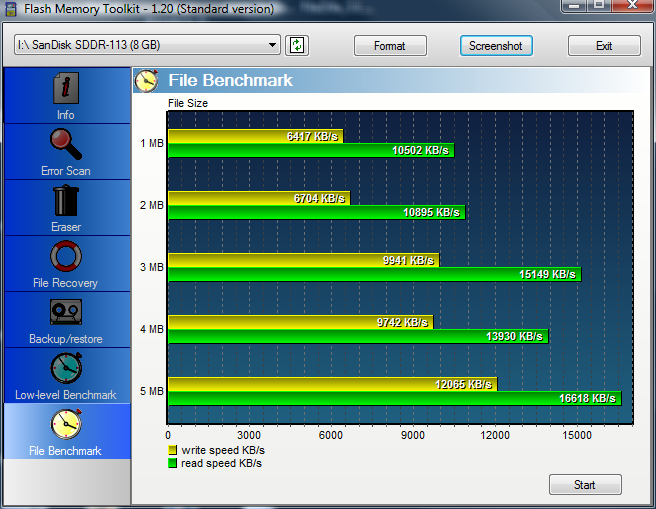


Set 3 with DMC-LX3 as card reader
Belkin eFilm DDSDFLS1-2GB


SanDisk Extreme III 8G


Transcend Class 6 8G
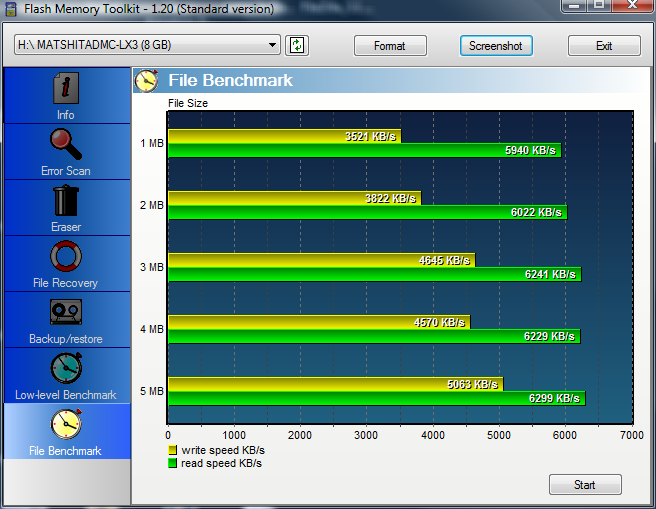
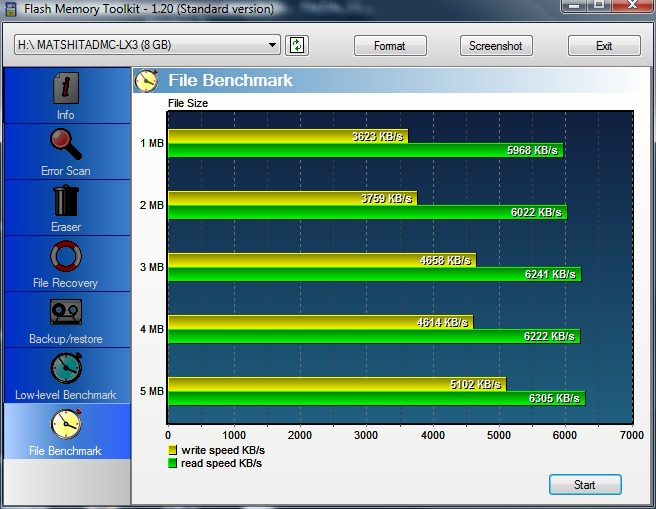
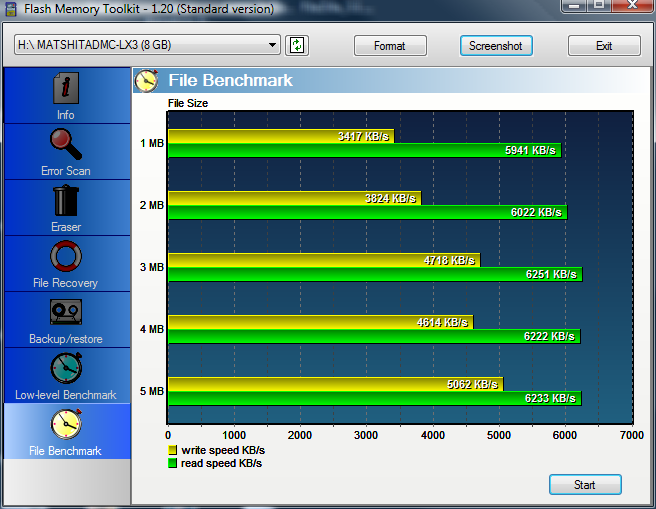
- I decided to cut the craps on testing the Wii card since it is purely wasting my time to wait for the test results after running it on the Apacer’s card reader.
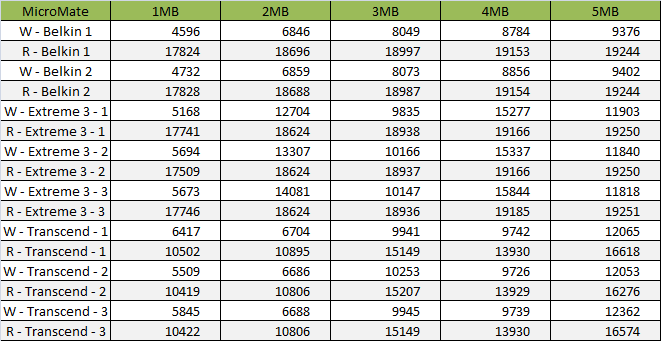
- The results are pretty interesting, different card readers seems have a very big impact on the read / write speeds.
- On the SanDisk Extreme III card that I tested, it seems like performing slower when having large files writing compared to the Transcend in the LX3, even the Belkin’s 2GB eFirm performs better on writing large files.
- On the other hand, the SanDisk Extreme III is the best performer among the 3 if using the SanDisk MicroMate reader.
Shots to Shots recorded time ( Manually using stopwatch on a Casio Watch )
The LX3 can records up to Maximum 3 Raw files before it is full and needed to flush the data into the Memory card. I tested each of the Fast card 3 times by continuing pressing the Shutter Release and start counting from the 2nd Shutter “Click” sound and wait until the “Writing Indicator” went off from the screen and stop the timer. I didn’t records them in 1/100th seconds and rounded up to nearest second as an average for each.
Belkin ~ 11sec
Sandisk Extreme III ~ 9sec
Transcend ~ 11sec
I am surprise to find this results after performing the “File Benchmark” first and the Manual Shots to Shots timing last. I have no idea what are the reasons behind or probably my test methods have not been the correct way / choosing a non so correct software to begin with.
Summary
Note : the Read / Write speeds are in kB/s
With Apacer Card Reader


With MicroMate Card Reader

With DMC-LX3
Conclusion


The tests I ran may not be correct and there are too many parameters that are unknown. e.g. what are the different when the LX3 is accessed as a card reader vs when Venus XI writing to the card directly. How does the software testing the Read / Write bandwidth ? How accurate is when I am trying to do a burst shots to shots + controlling the stopwatch and etc.
So, please do read these with a pinch of salt and make your own judgement. My test results may or may not be right and does not represents any real / accurate data that can be use as a reference for you to decides which card is best in the respective use case.
Thank you for reading, feel free to contact me if you have any questions, suggestions or pointing out what / where I done wrong.
I have added the Data arrays and Summary graphs. Too bad that the graphs are a bit small when I do the export from Excel.
Hey, thanks for sharing. Perhaps you can draw a comparison chart on your own to wrap up the benchmark test, to help us to visualise it clearer without glancing through all the individual charts.
Anyway, good work and hope to get more photography related tips here 🙂
思斌´s lastest post..运输成本
Thanks for the suggestion, I have thought of that before posting ( put in histogram / bar chart. ). It was late last night and also kind of lazy that time after the tests. I will add them tonight if i manage to.
Kuen Hoong´s lastest post..Planet Hollywood享用晚餐
Thanks for sharing!
wow….
u go to test one by one ah…
deejaywyw´s lastest post..姓名吉凶
Yah, test them one by one.. hopes someone could have benefit from the information.